
A mortgage calculator is a simple online tool that helps you figure out how much your monthly home loan payment will be. Think of it as your financial crystal ball—it shows you exactly what to expect before you ever sign on the dotted line. Whether you’re a first-time homebuyer or looking to refinance your existing mortgage, this powerful tool takes the guesswork out of budgeting for your new home.
The beauty of a mortgage payment calculator lies in its simplicity. You don’t need to be a math wizard or financial expert to use one. With just a few basic numbers, you can get an accurate estimate of your monthly housing costs in seconds. This knowledge empowers you to shop for homes within your budget, compare different loan options, and avoid the heartbreak of falling in love with a house you can’t afford.
But here’s the thing: not all calculators are created equal. Some only show you the basic principal and interest, while others give you the complete picture including taxes, insurance, and other costs. Understanding how these tools work—and which one to use—can save you thousands of dollars over the life of your home loan.
How Does a Mortgage Calculator Work?
At its core, a uses a mathematical formula to determine your monthly payment based on several key factors. Don’t worry—you don’t need to understand complex equations to use one. But having a basic grasp of what goes into the calculation will make you a smarter homebuyer.
The Basic Formula Behind Your Monthly Payment
The standard formula that most calculators use looks like this:
M = P × ((I × (1 + I)^T) ÷ ((1 + I)^T – 1))
Don’t let this scare you! Here’s what each letter means in plain English:
- M = Your monthly mortgage payment (this is what you’re trying to find)
- P = Principal amount (the total amount you’re borrowing)
- I = Monthly interest rate (your annual rate divided by 12)
- T = Total number of payments (loan term in months—360 for a 30-year loan)
Let’s break this down with a real example. Say you’re buying a $400,000 home with a 20% down payment. Your loan amount would be $320,000. If your interest rate is 7% on a 30-year fixed mortgage, your monthly principal and interest payment would be approximately $2,129.
But wait—that’s not your total monthly payment. And this is where many first-time buyers get tripped up.
Understanding PITI: The Four Components of Your Mortgage Payment
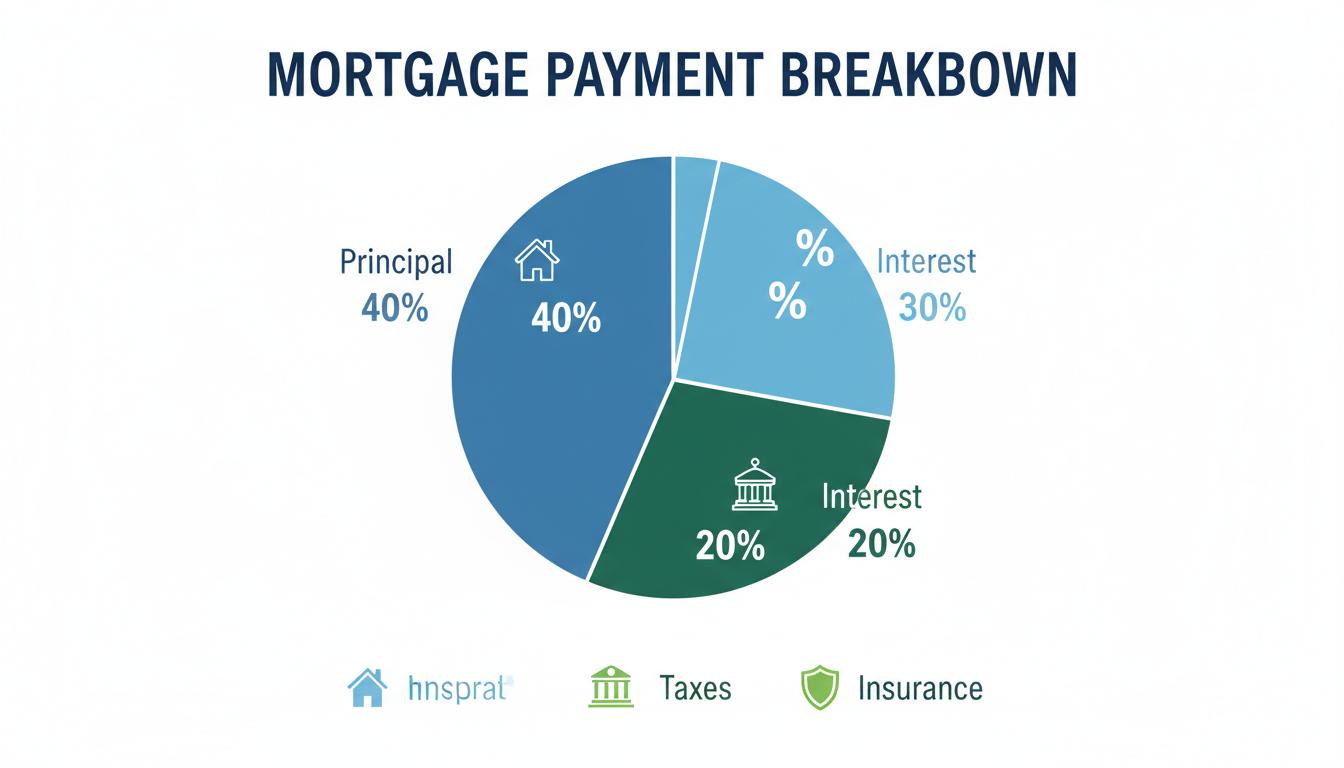
Mortgage Payment Breakdown
When lenders talk about your monthly mortgage payment, they often use the acronym PITI. This stands for Principal, Interest, Taxes, and Insurance. A comprehensive mortgage calculator will include all four of these components to give you the true cost of homeownership.
1. Principal: Paying Down Your Loan Balance
The principal is the actual amount you borrowed to buy your home. Every month, a portion of your payment goes toward reducing this balance. In the early years of your mortgage, this portion is relatively small. But as time goes on, more and more of your payment goes toward principal, helping you build equity in your home.
For example, on that $320,000 loan we mentioned earlier, your first payment might include only about $260 toward principal, with the rest going to interest. But by year 15, over $600 of your monthly payment would be reducing your loan balance.
2. Interest: The Cost of Borrowing Money
Interest is what the lender charges you for the privilege of borrowing their money. It’s calculated as a percentage of your remaining loan balance. When you first start paying your mortgage, a large chunk of your monthly payment goes toward interest. This is why the first few years of homeownership can feel like you’re not making much progress on your loan balance.
Your interest rate has a huge impact on your monthly payment. Even a small difference of 0.5% can mean hundreds of dollars per month. This is why shopping around for the best home loan rate is so important.
3. Property Taxes: Your Contribution to the Community
Property taxes are annual taxes assessed by your local government based on the value of your home. These taxes fund essential services like schools, roads, police, and fire departments. The amount varies widely depending on where you live—some areas have rates as low as 0.5% of your home’s value, while others can exceed 2%.

Most lenders require you to pay a portion of your annual property taxes with each monthly mortgage payment. They hold this money in an escrow account and pay the tax bill when it comes due. A good mortgage payment calculator will estimate your property taxes based on your ZIP code and home value.
4. Insurance: Protecting Your Investment
There are two types of insurance typically included in your monthly payment:
Homeowners Insurance: This protects your home and belongings from damage caused by fires, storms, theft, and other covered events. Most lenders require you to have this insurance, and like property taxes, the cost is often paid through your escrow account. Annual premiums typically range from $800 to $2,000, depending on your home’s value and location.
Private Mortgage Insurance (PMI): If your down payment is less than 20% of the home’s purchase price, you’ll likely need to pay PMI. This insurance protects the lender if you default on your loan. PMI typically costs between 0.3% and 1.5% of your original loan amount per year. The good news? Once you build up 20% equity in your home, you can usually cancel PMI.
Types of Mortgage Calculators: Which One Should You Use?
Not every mortgage calculator serves the same purpose. Depending on where you are in your homebuying journey, different calculators can help answer different questions. Here are the most common types and when to use them:
Basic Mortgage Payment Calculator
This is the most common type of calculator. It shows you your estimated monthly payment based on your loan amount, interest rate, and loan term. Some basic calculators only show principal and interest, while more advanced versions include estimates for taxes and insurance.
Best for: Getting a quick estimate of your monthly costs once you know your loan details.
Mortgage Affordability Calculator
Before you start house hunting, you need to know how much you can actually afford. An affordability calculator takes your income, monthly debts, down payment amount, and other financial factors to determine a realistic home price range.
Best for: First-time buyers who are just starting their home search and need to set a budget.
Refinance Calculator
Already have a mortgage? A refinance calculator helps you determine whether getting a new loan makes financial sense. It compares your current mortgage terms with potential new terms to show you how much you could save—or if refinancing would actually cost you more.
Best for: Homeowners considering refinancing to lower their rate, change their loan term, or access equity.
Extra Payment Calculator
Want to pay off your mortgage faster? This calculator shows you how making additional payments—whether monthly, annually, or as a one-time lump sum—can reduce your loan term and save you thousands in interest.
Best for: Homeowners looking to build equity faster and become debt-free sooner.
Adjustable-Rate Mortgage (ARM) Calculator
Unlike fixed-rate mortgages where your payment stays the same, ARMs have interest rates that can change over time. An ARM calculator helps you understand how your payments might increase (or decrease) when your rate adjusts.
Best for: Buyers considering an adjustable-rate mortgage who want to understand the risks and potential savings.
How to Use a Mortgage Calculator: Step-by-Step Guide


Couple Using Mortgage Calculator
Using a mortgage calculator is straightforward, but getting accurate results requires entering the right information. Follow these steps to get the most reliable estimate:
Step 1: Enter Your Home Price
Start with the purchase price of the home you’re considering. If you don’t have a specific house in mind yet, enter a price range that fits your budget. Remember, it’s better to start conservative and work your way up than to set yourself up for disappointment.
Step 2: Input Your Down Payment
Your down payment is the amount you’re paying upfront, not financing with a mortgage. You can enter this as a dollar amount or a percentage of the home price. Most calculators let you choose either option.
The size of your down payment has a big impact on your monthly payment: – 20% or more: No PMI required, lower monthly payment – 10-19%: Lower PMI costs, manageable monthly payment – 3.5-10%: Higher PMI costs, but gets you into a home sooner – 0% (VA/USDA loans): No down payment required for eligible buyers
Step 3: Select Your Loan Term
The most common loan terms are 30 years and 15 years, though some lenders offer 20-year and 10-year options as well. Here’s how they compare:
30-Year Mortgage: – Lower monthly payments – More flexibility in your budget – Higher total interest paid over the life of the loan – Good for buyers who want lower monthly obligations
15-Year Mortgage: – Higher monthly payments – Much less total interest paid – Build equity faster – Good for buyers with stable, higher incomes
Step 4: Enter Your Interest Rate
Your interest rate has a massive impact on your monthly payment. Even a 1% difference can change your payment by hundreds of dollars. Check current mortgage rates online or talk to lenders to get a realistic number to enter.
Keep in mind that the rate you see advertised may not be the rate you qualify for. Your actual rate depends on factors like your credit score, debt-to-income ratio, down payment amount, and loan type.
Step 5: Add Property Taxes and Insurance
For the most accurate estimate, enter your expected property taxes and homeowners insurance. If you don’t know these numbers, most calculators can estimate them based on your location and home value. Don’t skip this step—taxes and insurance can add hundreds of dollars to your monthly payment.
Step 6: Include PMI if Applicable
If your down payment is less than 20%, make sure the calculator includes PMI in your estimate. Some calculators do this automatically, while others require you to check a box or enter the PMI rate manually.
Common Mistakes to Avoid When Using a Mortgage Calculator
Even the best mortgage payment calculator is only as good as the information you put into it. Here are the most common mistakes people make—and how to avoid them:
Mistake #1: Forgetting About HOA Fees
If you’re buying a condo or a home in a planned community, you may have monthly homeowners association (HOA) fees. These can range from $100 to over $1,000 per month, depending on the amenities and services provided. Many calculators don’t include HOA fees, so make sure to add them to your estimated monthly costs.
Mistake #2: Using Unrealistic Interest Rates
It’s tempting to use the lowest advertised rate you see online, but that rate may not reflect what you’ll actually qualify for. Be honest about your credit score and financial situation when estimating your rate. It’s better to be pleasantly surprised than unpleasantly shocked.
Mistake #3: Ignoring Closing Costs
A mortgage calculator shows your ongoing monthly costs, but don’t forget about the upfront expenses. Closing costs typically range from 2% to 5% of your loan amount and include fees for appraisals, inspections, title insurance, lender fees, and more. On a $300,000 loan, that’s $6,000 to $15,000 you’ll need to have saved up.

Mistake #4: Not Accounting for Maintenance and Repairs
Homeownership comes with ongoing maintenance costs that renters don’t face. Experts recommend budgeting 1% to 3% of your home’s value annually for maintenance and repairs. On a $400,000 home, that’s $4,000 to $12,000 per year, or $333 to $1,000 per month.
Mistake #5: Assuming Your Payment Will Stay the Same
Even with a fixed-rate mortgage, your monthly payment can change over time. Property taxes and insurance premiums typically increase each year, which means your escrow payment will go up too. Make sure you have some wiggle room in your budget for these increases.
Tips for Lowering Your Monthly Mortgage Payment
Once you’ve used a mortgage calculator to see what your payment might be, you might be wondering how to make that number smaller. Here are proven strategies to reduce your monthly housing costs:
Make a Larger Down Payment
The more you put down upfront, the less you’ll need to borrow. A larger down payment also means: – Lower monthly payments – Less interest paid over the life of the loan – No PMI required (with 20% down) – Better loan terms and interest rates
If you can swing it, saving for a larger down payment is one of the best things you can do for your financial future.
Improve Your Credit Score
Your credit score is one of the biggest factors in determining your interest rate. Even a small improvement can lead to significant savings. Here are some ways to boost your score: – Pay all bills on time – Reduce credit card balances – Don’t open new credit accounts before applying for a mortgage – Check your credit report for errors and dispute any inaccuracies
A credit score of 740 or higher will typically get you the best rates. If your score is below 620, you may have trouble qualifying for a conventional loan at all.
Shop Around for the Best Rate
Don’t just accept the first home loan offer you receive. Different lenders offer different rates and fees, and shopping around can save you thousands. Get quotes from at least three to five lenders, including banks, credit unions, and online lenders.
When comparing offers, look at the Annual Percentage Rate (APR), not just the interest rate. The APR includes fees and gives you a more accurate picture of the total cost.
Consider a Longer Loan Term
While a 15-year mortgage saves you money on interest, the monthly payments are significantly higher. If you need lower payments to make homeownership affordable, a 30-year loan might be the better choice. You can always make extra payments to pay off your loan faster if your financial situation improves.
Buy Down Your Rate with Points
Mortgage points are fees you pay upfront to lower your interest rate. One point typically costs 1% of your loan amount and reduces your rate by about 0.25%. If you plan to stay in your home for many years, buying points can save you money over time.
For example, on a $300,000 loan, one point would cost $3,000. If that reduces your rate from 7% to 6.75%, you could save around $50 per month, or $18,000 over a 30-year loan. You’d break even after about 5 years.
Look into First-Time Homebuyer Programs
Many states and local governments offer programs to help first-time buyers with down payment assistance, lower interest rates, or tax credits. These programs can make homeownership more affordable, especially if you’re struggling to save for a down payment.
When to Use a Mortgage Calculator During Your Homebuying Journey
A mortgage calculator isn’t just a one-time tool. You should use it at multiple stages of your homebuying process:
Early Planning (6-12 Months Before Buying)
Use an affordability calculator to determine your budget. This helps you set realistic expectations and gives you a target to save toward. Play around with different down payment amounts and interest rates to see how they affect what you can afford.
House Hunting
As you look at specific homes, use a payment calculator to see what each one would cost you monthly. This helps you quickly eliminate homes that are outside your budget and focus on properties you can actually afford.

Comparing Loan Offers
Once you start getting pre-approved and receiving loan estimates from lenders, use a calculator to compare different scenarios. See how a slightly higher rate from one lender compares to another lender’s offer with lower fees.
Making an Offer
Before you submit an offer on a home, run the numbers one more time. Make sure you’re comfortable with the monthly payment and that it fits within your overall budget.
After Closing
Keep using a calculator to explore strategies for paying off your mortgage faster. See how extra payments could reduce your loan term and save you money on interest.
The Bottom Line: Knowledge Is Power
Buying a home is a huge financial commitment, but it doesn’t have to be scary. A mortgage calculator gives you the knowledge and confidence to make informed decisions throughout the homebuying process. By understanding your numbers upfront, you can avoid surprises, stay within your budget, and find a home that truly fits your financial situation.
Remember, the calculator is just a tool—it can’t replace the advice of a qualified mortgage professional. But it can help you ask better questions, compare your options more effectively, and ultimately make the best decision for your financial future.
So before you start browsing listings or attending open houses, spend some time with a mortgage payment calculator. Your future self will thank you for the preparation, and you’ll be well on your way to achieving the dream of homeownership.
Frequently Asked Questions About Mortgage Calculators
Are mortgage calculators accurate?
Mortgage calculators provide estimates based on the information you enter. They’re very accurate for principal and interest calculations, but estimates for taxes and insurance may vary. Always get official loan estimates from lenders before making decisions.
Can I trust online mortgage calculators?
Reputable calculators from banks, credit unions, and financial websites are generally trustworthy. Just make sure you’re using one that includes all the costs, not just principal and interest.
Do mortgage calculators include closing costs?
Most calculators focus on monthly payments and don’t include closing costs. Budget separately for these upfront expenses, which typically range from 2% to 5% of your loan amount.
How often should I use a mortgage calculator?
Use a calculator whenever your situation changes—when you’re considering a different home price, comparing loan offers, or thinking about making extra payments. It’s a valuable tool throughout your homeownership journey.
Can a mortgage calculator tell me if I’ll be approved for a loan?
No, a calculator only shows you what your payment might be. It doesn’t consider your credit score, income, debt-to-income ratio, or other factors lenders use to determine approval. For that, you’ll need to get pre-qualified or pre-approved by a lender.
Ready to take the next step? Start by using a mortgage calculator to explore your options, then reach out to a qualified lender to discuss your specific situation. Your dream home might be more affordable than you think!